Have you ever opened your messaging app and noticed the letters “RCS” where you normally expect a regular text message? If you’re wondering what does RCS mean, you’re not alone.
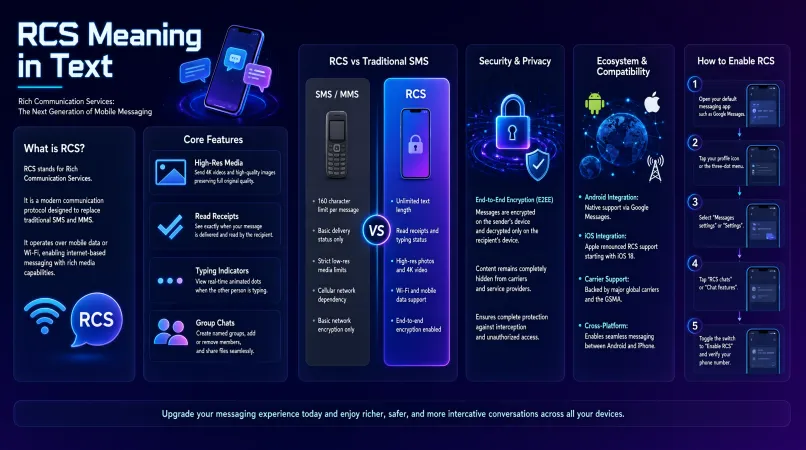
RCS stands for Rich Communication Services, a modern messaging standard designed to provide more features than traditional SMS and MMS.
Depending on your phone and messaging app, RCS can let you send high-quality photos and videos, see when messages are delivered or read, view typing indicators, use message reactions, and enjoy richer group chats.
You may see terms such as “RCS chat,” “RCS message,” or “RCS messaging” while texting, especially on supported Android and iPhone devices.
But what exactly happens when you send an RCS message, and how is it different from a normal text? In this guide, we’ll explain RCS meaning in texting, how RCS works, its features, costs, security, compatibility, and how it compares with SMS and MMS.
Quick Answer: What Does RCS Mean?
RCS means Rich Communication Services.
It is a modern messaging standard that adds advanced chat features to traditional mobile messaging. Instead of being limited to basic text messages, RCS can support features such as:
- Read receipts
- Typing indicators
- High-quality photos and videos
- Message reactions
- Better group chats
- Larger and richer media
- Messaging over Wi-Fi or mobile data
In simple terms, RCS makes regular texting work more like a modern internet-based chat service.
What Does RCS Mean in Texting?
When you see RCS in texting, it usually means that your conversation is using Rich Communication Services instead of basic SMS or MMS.
For example, your messaging app might show an RCS or chat indicator when you are communicating with someone whose device and messaging service support RCS.
An RCS conversation can provide features that ordinary SMS does not offer. You may be able to see when the other person is typing, receive read receipts, send better-quality media, and interact with messages using reactions.
So, if you’re asking “what does RCS mean in a text?”, the simple answer is:
RCS means the message is being sent using Rich Communication Services, a richer and more modern messaging system.
What Is an RCS Message?
An RCS message is a message sent using the RCS messaging standard.
Unlike traditional SMS, which was designed primarily for short text messages, RCS is built to support a broader messaging experience.
Depending on the service and devices involved, an RCS message may include:
- Text
- Photos
- Videos
- Reactions
- Read receipts
- Typing indicators
- Group-chat features
- Other rich content
The exact features available can vary depending on the messaging app, device, carrier, region, and whether the other person supports RCS.
What Does RCS Chat Mean?
RCS chat refers to a conversation that uses RCS features rather than basic SMS or MMS.
You may see terms such as “RCS chats” or “chat features” in a messaging app’s settings.
For example:
You: “Are you coming to dinner?”
Friend: “Yes, I’ll be there at 7.”
If the conversation is using RCS, you may also see typing indicators, read receipts, or other chat features that aren’t part of basic SMS.
The word “chat” doesn’t change the meaning of RCS. It simply describes the richer conversation experience provided through RCS.
How Does RCS Messaging Work?
RCS generally uses an internet connection rather than the traditional SMS network alone.
When you send an RCS message, your messaging app communicates through an RCS service. If both sides meet the requirements for an RCS conversation, the message can use RCS features.
An RCS conversation generally depends on:
- A compatible messaging app
- RCS support on the device or service
- An internet connection
- A recipient who can participate in the RCS conversation
If RCS isn’t available, the messaging service may use another messaging method, such as SMS or MMS, depending on the circumstances and settings.
Main Features of RCS
One reason people search for RCS meaning in texting is because they notice features that don’t appear in ordinary text messages.
Read Receipts
RCS can support read receipts.
This can let you know when a message has been opened or read, depending on the messaging service and the users’ settings.
This is different from traditional SMS, which does not provide a universal built-in read-receipt system.
Typing Indicators
RCS can show when someone is typing a response.
You may see dots or another typing indicator while the other person is composing a message.
This makes an RCS conversation feel more like other modern chat applications.
High-Quality Photos and Videos
RCS can support richer media sharing than traditional MMS.
This can make it easier to send photos and videos without the same limitations associated with basic multimedia texting.
Message Reactions
Supported RCS conversations can allow users to react to messages.
Instead of typing a separate response, you may be able to add an emoji or reaction to a message.
Better Group Chats
RCS provides more advanced group-chat capabilities than traditional SMS/MMS in supported conversations.
Depending on the service, you may have better support for participants, media, reactions, and other chat features.
Richer Content
RCS is designed to support more than simple text.
Depending on the implementation, it can support richer media, files, locations, and other interactive messaging features.
RCS vs. SMS
One of the most important comparisons is RCS vs. SMS.
| Feature | RCS | SMS |
|---|---|---|
| Full name | Rich Communication Services | Short Message Service |
| Internet connection | Generally uses internet | Doesn’t require internet |
| Read receipts | Supported | Not a standard SMS feature |
| Typing indicators | Supported | No |
| Rich media | Supported | Very limited |
| Group chat features | More advanced | Basic |
| Message reactions | Supported in compatible chats | Not built into SMS |
| Messaging experience | Modern chat | Basic texting |
The biggest difference is that SMS was designed for simple text messaging, while RCS is designed to provide a richer chat experience.
RCS vs. MMS
MMS stands for Multimedia Messaging Service and was developed to allow mobile users to send content such as pictures and multimedia messages.
RCS goes much further by adding modern chat capabilities.
For example, RCS can support:
- Typing indicators
- Read receipts
- Message reactions
- Better group conversations
- Richer media
- Internet-based messaging
MMS can send multimedia, but it doesn’t provide the same modern chat experience.
RCS vs. iMessage
RCS is an industry messaging standard designed for richer messaging across supported devices and services.
iMessage is Apple’s messaging service.
Both can provide features such as:
- Read receipts
- Typing indicators
- Rich media
- Group messaging
- Message reactions
However, their availability, features, and security can differ.
RCS is especially important for improving messaging between supported Android and iPhone users, while iMessage remains Apple’s own messaging platform.
What Does RCS Mean on Android?
On Android phones, you may encounter RCS through apps such as Google Messages or other supported messaging services.
Depending on the phone and messaging app, you may see a setting called:
- RCS chats
- Chat features
- Messaging features
When RCS is enabled and available for a conversation, your messages can use richer features instead of basic SMS/MMS.
If you’re using an Android phone and see “RCS” in your messaging settings, it generally refers to Rich Communication Services.
Does RCS Work on iPhone?
Yes, RCS messaging is supported on iPhone, although the available features can depend on the software version, carrier, region, and the messaging services involved.
RCS can improve messaging between iPhones and supported Android devices by providing more modern features than traditional SMS/MMS.
However, RCS is not the same thing as iMessage. iMessage continues to be Apple’s own messaging service.
Does RCS Use Wi-Fi or Mobile Data?
RCS generally uses an internet connection.
That can include:
- Wi-Fi
- Mobile/cellular data
For example, if your phone is connected to Wi-Fi, an RCS conversation can use that internet connection. If you’re away from Wi-Fi, mobile data may be used if available.
Your exact experience can depend on your device, messaging app, carrier, and service configuration.
Does RCS Cost Money?
RCS itself is not simply another paid messaging subscription.
Because RCS generally uses an internet connection, your Wi-Fi or mobile-data plan can determine whether there are any data-related costs.
For example, using RCS over Wi-Fi generally doesn’t consume cellular data. Using it over mobile data may count toward your data allowance.
Carrier policies can vary, so it’s best to check your specific mobile plan if you’re concerned about charges.
Does RCS Mean My Message Was Read?
Not necessarily.
RCS can support read receipts, but seeing RCS does not automatically mean that your message has been read.
There is an important difference between:
- Sent: Your message has been sent.
- Delivered: Your message has reached the recipient.
- Read: The recipient has opened or read the message.
Read receipts may depend on the messaging service and the settings of the people involved.
What Does “RCS Delivered” Mean?
If you see “delivered” on an RCS message, it generally means that the message has reached the recipient’s messaging service or device.
It does not necessarily mean the person has opened it.
That’s why “delivered” and “read” should not be treated as the same thing.
What Does “RCS Read” Mean?
If an RCS conversation supports read receipts and you see “read,” it generally indicates that the recipient has opened or viewed the message.
However, the exact display and behavior can vary between messaging apps and platforms.
Why Does My Text Say RCS?
If your messaging app says RCS, it usually means that the conversation is using Rich Communication Services.
Common reasons include:
- RCS is enabled.
- Your messaging app supports RCS.
- Your device supports RCS.
- The recipient supports RCS.
- An internet connection is available.
- Your carrier or messaging service supports the feature.
In other words, RCS is usually a sign that you’re using richer messaging features instead of basic SMS.
What Happens If RCS Isn’t Available?
If RCS isn’t available, the messaging service may fall back to SMS or MMS, depending on the device, app, settings, and circumstances.
For example, RCS might not be available if:
- The recipient doesn’t support it.
- RCS is disabled.
- There is no suitable internet connection.
- The messaging service is temporarily unavailable.
- The device or carrier doesn’t support the required features.
This is one reason you may sometimes notice different message types in the same messaging app.
Is RCS Safe and Secure?
RCS provides a more modern messaging framework than SMS, but security isn’t identical in every RCS implementation.
The level of encryption and privacy protection can depend on the messaging app, service, device, and type of conversation.
Therefore, it is better not to assume that every RCS message has exactly the same security protections.
If privacy is important, check the security information for the messaging service you’re using.
Advantages of RCS
RCS has several advantages over traditional SMS and MMS.
1. Richer Messaging
It supports more than basic text.
2. Better Media Sharing
Photos and videos can be shared with a richer experience.
3. Read Receipts
Supported conversations can show whether messages have been read.
4. Typing Indicators
You can see when another person is composing a response.
5. Better Group Chats
RCS supports more advanced group messaging features.
6. Message Reactions
Compatible conversations can support reactions.
7. Modern Chat Experience
Overall, RCS makes mobile texting feel closer to other modern messaging platforms.
Limitations of RCS
RCS isn’t perfect, and its availability can vary.
Some limitations include:
- Both sides may need compatible RCS support for certain features.
- An internet connection is generally required.
- Features can vary by messaging app.
- Carrier and regional support can differ.
- Not all RCS implementations offer identical features.
- Some conversations may fall back to SMS or MMS.
So, while RCS is more feature-rich than traditional texting, the experience isn’t necessarily identical for every user.
How to Turn RCS On or Off
The exact steps depend on your phone and messaging app.
On supported Android messaging apps, you can generally look for RCS chats or Chat features in the messaging settings.
A typical process may look like this:
- Open your messaging app.
- Open the app’s settings.
- Find RCS chats or Chat features.
- Check whether RCS is enabled.
- Turn the feature on or off according to your preference.
Settings can change as apps and operating systems are updated, so the exact menu may look different on your phone.
Common RCS Problems
RCS Is Stuck on Connecting
This can happen because of connectivity, verification, service, or configuration issues.
Try checking your internet connection and messaging settings first.
RCS Messages Won’t Send
Possible causes include:
- Weak or unavailable internet
- RCS being disabled
- Compatibility problems
- Temporary service issues
- Messaging app problems
RCS Suddenly Stopped Working
Check whether:
- Your messaging app is updated.
- RCS is still enabled.
- Your phone has internet access.
- Your number or account has been verified.
- The service is available in your region.
Real Examples of RCS Conversations
Example 1: Normal Chat
Alex: “Are you free tonight?”
Sam: “Yes, I’m free.”
In an RCS conversation, you may also see a typing indicator or read receipt.
Example 2: Sharing a Photo
Alex: “Look what I took today!”
Sam: “Wow! Send me the picture.”
RCS can provide a richer media-sharing experience than basic SMS.
Example 3: Read Receipt
Alex: “Are we still meeting at 6?”
Sam: “Yes.”
Depending on the service and settings, Alex may see that Sam has read the message.
RCS vs. SMS vs. MMS vs. iMessage
| Feature | RCS | SMS | MMS | iMessage |
|---|---|---|---|---|
| Basic text | Yes | Yes | Yes | Yes |
| Rich media | Yes | Limited | Yes | Yes |
| Read receipts | Supported | No standard feature | No standard feature | Yes |
| Typing indicators | Supported | No | No | Yes |
| Group chat features | Advanced | Basic | Basic | Advanced |
| Internet-based | Generally | No | Traditionally no | Yes |
| Message reactions | Supported | Limited | Limited | Yes |
| Main ecosystem | Cross-platform where supported | Broad | Broad | Apple |
The important point is that RCS is designed to bring modern chat features to mobile messaging, while SMS and MMS are older messaging standards.
RCS Meaning in Other Contexts
Although “RCS” usually means Rich Communication Services when you’re talking about texting, the abbreviation can have other meanings in different industries.
For example, RCS can refer to different organizations, technical terms, or professional concepts depending on the context.
If you saw RCS inside a messaging app or next to a text message, however, Rich Communication Services is the meaning you are most likely looking for.
Frequently Asked Questions About RCS
What does RCS stand for?
RCS stands for Rich Communication Services.
What does RCS mean in texting?
In texting, RCS means that your conversation is using the Rich Communication Services messaging standard rather than basic SMS or MMS.
What does RCS chat mean?
RCS chat refers to a conversation using RCS features such as read receipts, typing indicators, richer media, and improved group messaging.
What does RCS mean on Android?
On Android, RCS generally refers to Rich Communication Services available through a supported messaging app and service.
What is an RCS message?
An RCS message is a message sent using the Rich Communication Services standard.
Does RCS mean my message was read?
No. RCS supports read receipts, but seeing “RCS” does not automatically mean your message was read.
Is RCS the same as SMS?
No. SMS is a basic text messaging standard, while RCS is designed to provide a richer messaging experience.
Is RCS better than SMS?
For supported conversations, RCS offers more features than SMS, including typing indicators, read receipts, richer media, and improved group chats.
Does RCS use Wi-Fi?
Yes. RCS generally uses an internet connection, which can be Wi-Fi or mobile data.
Does RCS use mobile data?
It can. When you’re not connected to Wi-Fi, RCS may use your cellular/mobile data depending on your service and settings.
Is RCS free?
RCS does not normally work like a separate paid messaging subscription, but mobile-data usage may depend on your phone plan and carrier.
Does RCS work on iPhone?
Yes, RCS is supported on iPhone, although availability and features can depend on the iPhone software, carrier, region, and messaging service.
Can I turn RCS off?
On supported devices and messaging apps, you can generally disable RCS through the messaging settings.
Why does my text say RCS?
It usually means that your messaging app is using Rich Communication Services for that conversation.
Why is my RCS message not sending?
Check your internet connection, RCS settings, messaging app, recipient compatibility, and service availability. In some cases, the conversation may fall back to another messaging method.
Is RCS secure?
Security depends on the messaging app and RCS implementation. Don’t assume that every RCS conversation has identical encryption or privacy protections.
Final Takeaway
So, what does RCS mean? RCS stands for Rich Communication Services, a modern messaging standard designed to provide a richer experience than traditional SMS and MMS.
When you see RCS, RCS chat, or RCS message in your messaging app, it generally means that the conversation is using RCS features. These can include read receipts, typing indicators, message reactions, high-quality media, and improved group chats.
RCS is not simply another texting abbreviation. It is a messaging technology that aims to make traditional mobile texting more flexible and feature-rich. However, the exact experience can vary depending on your device, messaging app, carrier, region, and the person you’re messaging.

Emily Carter is a writer at MeaningNetworks, creating clear, engaging articles about texting slang, internet abbreviations, emojis, and social media language to help readers understand digital communication.